
|
Size: 660
Comment:
|
Size: 5427
Comment:
|
| Deletions are marked like this. | Additions are marked like this. |
| Line 1: | Line 1: |
| ## Please edit system and help pages ONLY in the master wiki! ## For more information, please see MoinMoin:MoinDev/Translation. ## IMPORTANT NOTE: ## When you use this page as a template for creating your project page: ## * please remove all lines starting with two hashes (##) ## * except the acl line, please keep that, but remove one hash, so it reads #acl ... ## * fix the acl line so it has the correct page instead of the sample Project/...Group ##acl Project/AdminGroup:admin,read,write,delete,revert Project/ReadWriteGroup:read,write Project/ReadGroup:read ##master-page:Unknown-Page ##master-date:Unknown-Date #format wiki #language en |
== MacOS Install & Setup == The examples below show how to unpack/install the Freesurfer 7.0.0 beta 1 MacOS tar archive, '''freesurfer-darwin-macOS_HighSierra-7.0.0-beta.tar.gz''', or pkg file, '''freesurfer-MacOS-7.0.0b1-x86_64.pkg'''. While the code was built and packaged on Mac OS 10.13 (High Sierra), you should follow the same instructions if you are running MacOS 10.12 (Sierra), 10.14 (Mojave) or 10.15 (Catalina). On Mac systems, the tar archive file (.tar.gz) can be expanded under any convenient path/subdirectory on your machine you have permission to write to. For example, you can expand the tar archive under your $HOME directory. To install freesurfer under a recommended shared system location, e.g., '''/Applications''', you may need sudo or root privileges. Please note that if you have sudo/root privileges, then you should consider using the package file (.pkg) to install the freesurfer 7.0.0 beta 1 release. Example of placing the Mac tar archive under the $HOME directory belonging to user "tester" '''without using sudo/root privileges'''. Setup commands follow. Shell is bash or Bourne shell. {{{ $ cd $HOME $ pwd /home/tester $ tar -zxvpf freesurfer-darwin-macOS_HighSierra-7.0.0-beta.tar.gz x freesurfer/ x freesurfer/ASegStatsLUT.txt x freesurfer/average/ x freesurfer/bin/ x freesurfer/build-stamp.txt x freesurfer/DefectLUT.txt ... .. <rest of output deleted> $ cd freesurfer $ pwd /home/tester/freesurfer $ export FREESURFER_HOME=$HOME/freesurfer $ export SUBJECTS_DIR=$FREESURFER_HOME/subjects $ source $FREESURFER_HOME/SetUpFreeSurfer.sh -------- freesurfer-darwin-macOS_HighSierra-7.0.0-beta-xxxxxx -------- Setting up environment for FreeSurfer/FS-FAST (and FSL) FREESURFER_HOME /home/tester/freesurfer FSFAST_HOME /home/tester/freesurfer/fsfast FSF_OUTPUT_FORMAT nii.gz SUBJECTS_DIR /home/tester/freesurfer/subjects MNI_DIR /home/tester/freesurfer/mni $ which freeview /home/tester/freesurfer/bin/freeview }}} Example of placing the Mac tar archive under the system location /Applications by user "tester" '''using sudo/root privileges'''. Setup commands follow. Shell is bash or Bourne shell. {{{ $ cd $HOME $ pwd /home/tester $ sudo tar -C /Applications -zxvpf freesurfer-darwin-macOS_HighSierra-7.0.0-beta.tar.gz x freesurfer/ x freesurfer/ASegStatsLUT.txt x freesurfer/average/ x freesurfer/bin/ x freesurfer/build-stamp.txt x freesurfer/DefectLUT.txt ... .. <rest of output deleted> $ export FREESURFER_HOME=/Applications/freesurfer $ export SUBJECTS_DIR=$FREESURFER_HOME/subjects $ source $FREESURFER_HOME/SetUpFreeSurfer.sh -------- freesurfer-darwin-macOS_HighSierra-7.0.0-beta-xxxxxx -------- Setting up environment for FreeSurfer/FS-FAST (and FSL) FREESURFER_HOME /Applications/freesurfer FSFAST_HOME /Applications/freesurfer/fsfast FSF_OUTPUT_FORMAT nii.gz SUBJECTS_DIR /Applications/freesurfer/subjects MNI_DIR /home/tester/freesurfer/mni $ which freeview /Applications/freeview/bin/freeview }}} ==== Using the Mac Package Installer ==== ''Please note - if you already have freesurfer installed as '''/Applications/freesurfer''', e.g., per the example above, then it is strongly advised that you remove the installation or rename the directory to be something other than freesurfer under /Applications. This is because the Mac pkg installer will install freesurfer under the path '''/Applications/freesurfer/<package version>'''''. The package installer will also save package receipts on the system and provides an uninstaller script as /Applications/freesurfer/<package version>/uninstall.sh ==== Performing the install ==== The screen shots below show the steps for running the package installer after the security exception has been made to allow the installer to run. On older versions of Mac OS, you will not get the notifications asking if files can be read from the disk. Double click on the installer icon to start the installation process. {{attachment:MacOS_install_info.png}} {{attachment:MacOS_install_1_8.png}} {{attachment:MacOS_install_2_8.png}} {{attachment:MacOS_install_3_8.png}} {{attachment:MacOS_install_4_8.png}} {{attachment:MacOS_install_5_8.png}} {{attachment:MacOS_install_6_8.png}} {{attachment:MacOS_install_7_8.png}} {{attachment:MacOS_install_8_8.png}} After the install by the package file is complete, Setting the environment follows the same procedure listed above except the path for '''FREESURFER_HOME''' is now '''/Applications/freesurfer/7.0.0b1'''. {{{ $ export FREESURFER_HOME=/Applications/freesurfer/7.0.0b1 $ export SUBJECTS_DIR=$FREESURFER_HOME/subjects $ source $FREESURFER_HOME/SetUpFreeSurfer.sh -------- freesurfer-darwin-macOS_HighSierra-7.0.0-beta-xxxxxx -------- Setting up environment for FreeSurfer/FS-FAST (and FSL) WARNING: /Users/synpro/freesurfer/fsfast does not exist FREESURFER_HOME /Applications/freesurfer/7.0.0b1 FSFAST_HOME /Users/synpro/freesurfer/fsfast FSF_OUTPUT_FORMAT nii.gz SUBJECTS_DIR /Applications/freesurfer/7.0.0b1/subjects MNI_DIR /Users/synpro/freesurfer/mni WARNING: MINC_BIN_DIR '/Users/synpro/freesurfer/mni/bin' does not exist. WARNING: MINC_LIB_DIR '/Users/synpro/freesurfer/mni/lib' does not exist. $ which freeview /Applications/freesurfer/7.0.0b1/bin/freeview }}} |
MacOS Install & Setup
The examples below show how to unpack/install the Freesurfer 7.0.0 beta 1 MacOS tar archive, freesurfer-darwin-macOS_HighSierra-7.0.0-beta.tar.gz, or pkg file, freesurfer-MacOS-7.0.0b1-x86_64.pkg. While the code was built and packaged on Mac OS 10.13 (High Sierra), you should follow the same instructions if you are running MacOS 10.12 (Sierra), 10.14 (Mojave) or 10.15 (Catalina).
On Mac systems, the tar archive file (.tar.gz) can be expanded under any convenient path/subdirectory on your machine you have permission to write to. For example, you can expand the tar archive under your $HOME directory. To install freesurfer under a recommended shared system location, e.g., /Applications, you may need sudo or root privileges. Please note that if you have sudo/root privileges, then you should consider using the package file (.pkg) to install the freesurfer 7.0.0 beta 1 release.
Example of placing the Mac tar archive under the $HOME directory belonging to user "tester" without using sudo/root privileges. Setup commands follow. Shell is bash or Bourne shell.
$ cd $HOME
$ pwd
/home/tester
$ tar -zxvpf freesurfer-darwin-macOS_HighSierra-7.0.0-beta.tar.gz
x freesurfer/
x freesurfer/ASegStatsLUT.txt
x freesurfer/average/
x freesurfer/bin/
x freesurfer/build-stamp.txt
x freesurfer/DefectLUT.txt
...
..
<rest of output deleted>

$ cd freesurfer
$ pwd
/home/tester/freesurfer
$ export FREESURFER_HOME=$HOME/freesurfer
$ export SUBJECTS_DIR=$FREESURFER_HOME/subjects
$ source $FREESURFER_HOME/SetUpFreeSurfer.sh
-------- freesurfer-darwin-macOS_HighSierra-7.0.0-beta-xxxxxx --------
Setting up environment for FreeSurfer/FS-FAST (and FSL)
FREESURFER_HOME   /home/tester/freesurfer
FSFAST_HOME       /home/tester/freesurfer/fsfast
FSF_OUTPUT_FORMAT nii.gz
SUBJECTS_DIR      /home/tester/freesurfer/subjects
MNI_DIR           /home/tester/freesurfer/mni

$ which freeview
/home/tester/freesurfer/bin/freeview
Example of placing the Mac tar archive under the system location /Applications by user "tester" using sudo/root privileges. Setup commands follow. Shell is bash or Bourne shell.
$ cd $HOME
$ pwd
/home/tester
$ sudo tar -C /Applications -zxvpf freesurfer-darwin-macOS_HighSierra-7.0.0-beta.tar.gz
x freesurfer/
x freesurfer/ASegStatsLUT.txt
x freesurfer/average/
x freesurfer/bin/
x freesurfer/build-stamp.txt
x freesurfer/DefectLUT.txt
...
..
<rest of output deleted>

$ export FREESURFER_HOME=/Applications/freesurfer
$ export SUBJECTS_DIR=$FREESURFER_HOME/subjects
$ source $FREESURFER_HOME/SetUpFreeSurfer.sh
-------- freesurfer-darwin-macOS_HighSierra-7.0.0-beta-xxxxxx --------
Setting up environment for FreeSurfer/FS-FAST (and FSL)
FREESURFER_HOME   /Applications/freesurfer
FSFAST_HOME       /Applications/freesurfer/fsfast
FSF_OUTPUT_FORMAT nii.gz
SUBJECTS_DIR      /Applications/freesurfer/subjects
MNI_DIR           /home/tester/freesurfer/mni

$ which freeview
/Applications/freeview/bin/freeview
Using the Mac Package Installer
Please note - if you already have freesurfer installed as /Applications/freesurfer, e.g., per the example above, then it is strongly advised that you remove the installation or rename the directory to be something other than freesurfer under /Applications. This is because the Mac pkg installer will install freesurfer under the path /Applications/freesurfer/<package version>.
The package installer will also save package receipts on the system and provides an uninstaller script as /Applications/freesurfer/<package version>/uninstall.sh
Performing the install
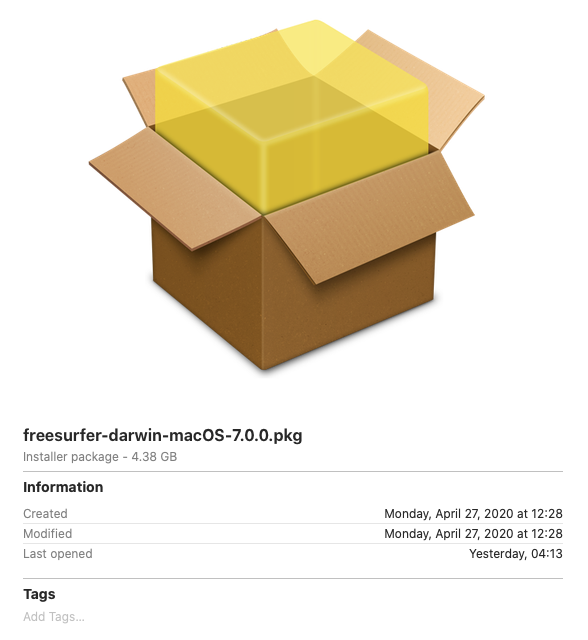
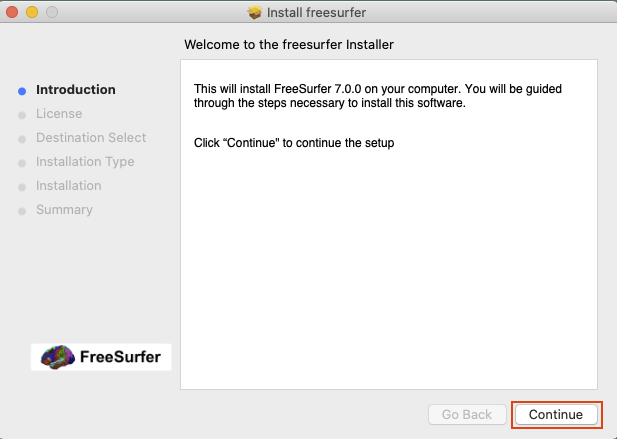
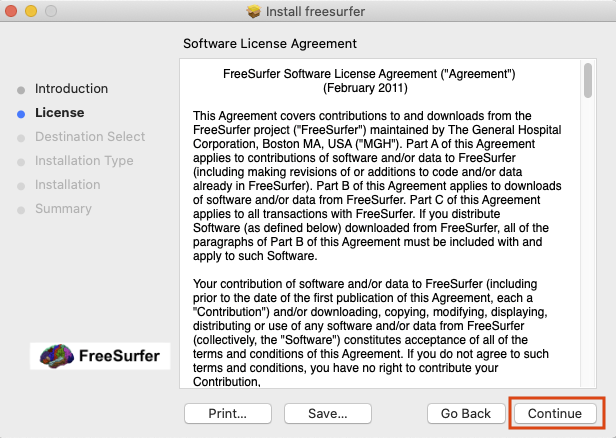
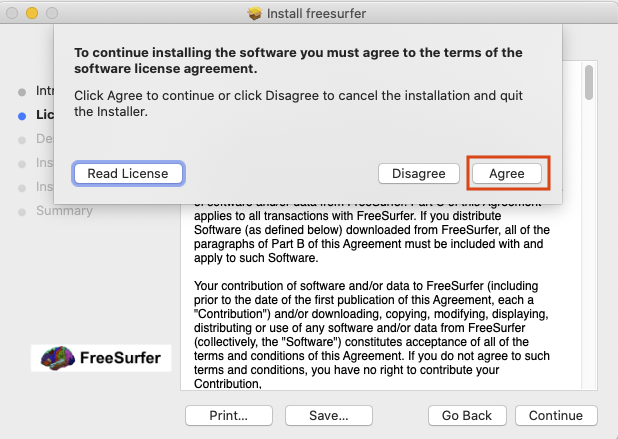
The screen shots below show the steps for running the package installer after the security exception has been made to allow the installer to run. On older versions of Mac OS, you will not get the notifications asking if files can be read from the disk. Double click on the installer icon to start the installation process.
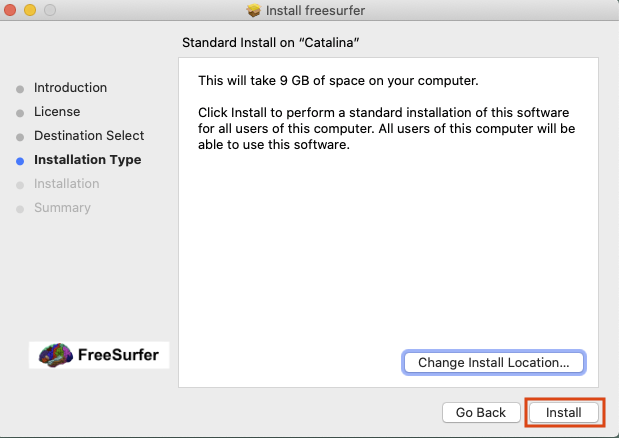
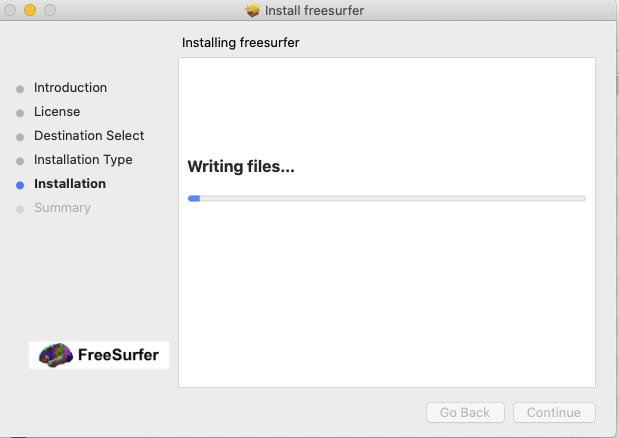
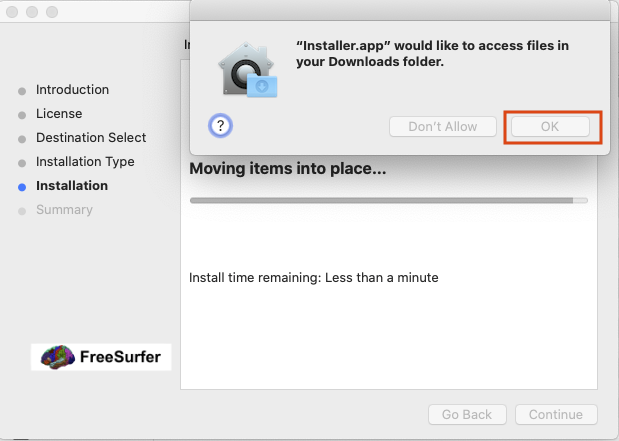

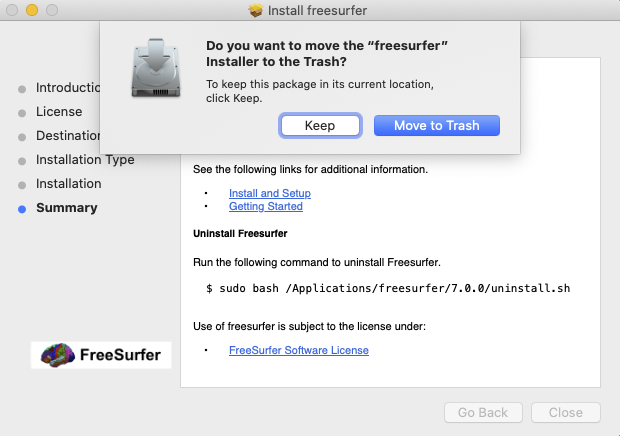
After the install by the package file is complete, Setting the environment follows the same procedure listed above except the path for FREESURFER_HOME is now /Applications/freesurfer/7.0.0b1.
$ export FREESURFER_HOME=/Applications/freesurfer/7.0.0b1
$ export SUBJECTS_DIR=$FREESURFER_HOME/subjects
$ source $FREESURFER_HOME/SetUpFreeSurfer.sh
-------- freesurfer-darwin-macOS_HighSierra-7.0.0-beta-xxxxxx --------
Setting up environment for FreeSurfer/FS-FAST (and FSL)
WARNING: /Users/synpro/freesurfer/fsfast does not exist
FREESURFER_HOME   /Applications/freesurfer/7.0.0b1
FSFAST_HOME       /Users/synpro/freesurfer/fsfast
FSF_OUTPUT_FORMAT nii.gz
SUBJECTS_DIR      /Applications/freesurfer/7.0.0b1/subjects
MNI_DIR           /Users/synpro/freesurfer/mni
WARNING: MINC_BIN_DIR '/Users/synpro/freesurfer/mni/bin' does not exist.
WARNING: MINC_LIB_DIR '/Users/synpro/freesurfer/mni/lib' does not exist.

$ which freeview
/Applications/freesurfer/7.0.0b1/bin/freeview