
Important Phone Numbers
- Security Desk x6-5400
- Buildings and Grounds - x6-5270 (fix broken fixtures, change light bulbs, move furniture, install whiteboards etc.)
- Environmental Services - x6-5490 (book conference rooms, housekeeping issues)
- Fire/Chemical Safety- x4-8419 (chemical spill, report fire hazards, chemical exposure, etc.)
- MGH Operator x6-2000
- Bruce - x6-4897
- Allison - x6-4050
- Biochem Lab x-65823 (our lab downstairs where we pack brains)
- Bay 5 x4-8840
- RF Lab 643-5106
- Parking - x4-6588
Our room # is 2248 but the Admin office where mail goes is 2301. Our full address is:
Massachusetts General Hospital
Athinoula A. Martinos Center for Biomedical Imaging
Bldg. 149, 13th Street, CNY 2301
Charlestown, MA 02129
You can find directions to our location here:
https://surfer.nmr.mgh.harvard.edu/fswiki/DirectionsCNY
Contents
- Important Phone Numbers
- LCN Orientation for New Staff
- Lab Basics
- Martinos Center Basics
- Partners/MGH Basics
- Learning the Basics
- Life Basics
LCN Orientation for New Staff
Things to do during your first week
Encrypt & Register Your Laptop
http://helpdeskselfservice.partners.org/applications/encryption/encryptionfaqs.aspx https://www.martinos.org/martinos/secure/changePass.php
Join the Lab Mailing List
Ask Allison to subscribe you to the lab's email list if she hasn't already.
Create a Wiki Account
We use a wiki to not only document FreeSurfer, but to document our projects as well. You will probably be asked to create a wiki in order to document your work. In order to do this you willhave to get a wiki username. You can do that here: https://surfer.nmr.mgh.harvard.edu/fswiki/GettingAccess
(be sure to follow through on Step 2 and email fswiki-help@nmr.mgh.harvard.edu and cc Allison to have your profile added to the Users List and various access groups).
Once you have a username, you can create a wiki or edit an existing one.
Update Martinos Center Profile
Set up your Martinos Center profile to be displayed on the martinos.org website. Directions for how to do so are here.
The lab has its own website where your profile can also be displayed:
http://martinos.org/lcn/ Please send a brief description of your background and what you're working on to Louis (vinke@nmr) so he can update the page with your info.
Training
You are required to meet a variety of training requirements depending on what type of work you will do here. Just about everyone must do the IRB Training & the Fire safety training.
Required Training
IRB Training
You will have to renew this training every 3 years.
In order to work with human subjects data, you must be certified to do so. To get certified, you have to read a couple of articles and then take a quiz on the material you have read. This takes a few hours but is important to do before you can start work on any projects. You can find information on how to do the training here:
http://healthcare.partners.org/phsirb/aboutciti.htm
When you have successfully completed the course, please email Allison (astevens AT nmr.mgh.harvard.edu) a copy of the completion certificate (you may want to keep a copy for your own records) so she can add you to the appropriate IRB protocols.
You'll also need to give Allison a print out of your CV with your signature and the date at the top.
Fire Safety Training
This training must be done once a year.
For Non-Lab Personnel:
Please complete the course on Fire and Safety training for Research & Clinical Lab Personnel within 30 days of your start date.
http://www.partners.org/healthstream
If you've never logged into healthstream before, it takes your Partners username and the password abc123. You'll find the training under Catalog > Search by Category > MGH General Safety Training.
For Lab Personnel:
Please complete the course on Fire and Safety training within 30 days of your start date.
https://hub.partners.org/register/?return%5furl=%2flab%2dsafety%2f
Other Training
MR Safety Training
If you plan to spend any time in the scanner bays, you will have to do the MR Safety training.
For the large bore scanners, subscribe to the mri-scan email list to get announcements about the next scheduled safety training. Mary Foley (O'Hara) holds a safety course about once a month and sends the dates and times for this course to this list. The training consists of watching a video and taking a quiz. If you pass the quiz, you will get a yellow badge which allows you in the scanner bays with supervision. Four months after you receive your yellow badge, you can take the exam to get your green badge which allows you to scan without supervision.
Once you complete the MR safety training, ask Allison to request a scanner login account for you from Karen Dervin (you may already have one if Allison requested it when you were first hired) & to add you to the appropriate scanner projects.
For small bore scanners, contact George Dai for access and training. You will have to attend scan sessions with an approved supervisor until you feel comfortable to take the small bore scanning exam.
Shipping Infectious Substances Training
If you will be working in the wet lab and shipping tissue samples, you must complete the training below:
http://intranet.massgeneral.org/ehs/ehs_programs_trainingprogram.htm#2
Active Shooter Training
What to do in the event of a shooter on campus:
http://intranet.massgeneral.org/digitalmedia/MGH/PoliceAndSecurity/index.html
Lab Basics
Lab Meetings
We have lab meetings every Wednesday at 2pm in Chesler Library (and occasionally in room 2695).
Emails about what will be covered during the meeting go out each week to the lab email list (lcn@nmr...) to which you can also send announcements once you have been added to the list (Allison or Lilla can add you).
You can check your Martinos Center email from anywhere (except you shouldn't use public computers) using this link:
https://mail.nmr.mgh.harvard.edu/webmail/src/login.php
or feel free to use pine, Thunderbird, Outlook, or any other mail program on and off-site. Just be sure to follow the Encryption rules (can't access email without an encrypted laptop; non-public desktops are okay; phones have additional requirements):
http://helpdeskselfservice.partners.org/applications/encryption/encryptionfaqs.aspx
Tip: Typing out "@nmr.mgh.harvard.edu" can get annoying! You can also get email by replacing all of that with @martinos.org.
Partners Email
You should check your Partners email often. Most importantly, IRB notifications will be sent to this address. They'll also send emails about benefits, holiday parties, summer picnics, flu shot clinics, emergency situations, etc. to the Partners one but not to your Martinos Center one.
Partners email can be checked here:
Instructions on forwarding which is not allowed are here:
https://www.nmr.mgh.harvard.edu/martinos/userInfo/computer/outlook/index.php
You might also want to set up your Partners profile so you can be searched from the Partners database here. Here, if you chose MGH for the email distribution list, you will get important hospital-wide announcements, mentioned above, sent to your Partners email.
Group & IRB Permissions
A list of the lab's unix groups and IRBs are on the page below. If you need to be added to a group to gain file access, let Allison know. You will have to be on the appropriate IRB before you can be added to the corresponding group: https://surfer.nmr.mgh.harvard.edu/fswiki/LcnAdmin
Printing
If you need to print, you can send jobs to 'decacolor' which is located in the same area as the fridge. To print double-sided, print to 'decadouble'.
LCN online notebook
You can find some helpful tips from the life-practical (the process of getting a bank account for someone who just moved to the U.S.) to work-helpful (common commands used in exvivo processing): www.evernote.com username: lcn149 password: ask Allison, Louis, or Maritza
Freesurfer
Documentation for FreeSurfer is on the wiki:
https://surfer.nmr.mgh.harvard.edu/fswiki/FreeSurferWiki
You can find online tutorials teaching you how to use FreeSurfer here:
https://surfer.nmr.mgh.harvard.edu/fswiki/FsTutorial/
Before downloading the tutorial dataset, check with Allison to see if she has a copy already downloaded that you can use.
The developer's guide with information about checking out code, adding new binaries, etc. can be found here
https://surfer.nmr.mgh.harvard.edu/fswiki/DevelopersGuide
If you want to search for something on the wiki, you'll have the best luck if you click the 'Text' button to search rather than the 'Titles' button. You can find a full list of all material on the wiki here:
https://surfer.nmr.mgh.harvard.edu/fswiki/TitleIndex
To learn more about FreeSurfer, you can sit in on one of our local FreeSurfer courses or lectures. Check with Allison to see when the next one will be.
Martinos Center Basics
Computer Resources
Topics include remote access, purchasing cluster storage space, purchasing hardware & software, mailing lists, web space, etc.
https://www.nmr.mgh.harvard.edu/martinos/userInfo/computer/index.php
http://www.martinos.org/martinos/userInfo/computer/faq.php
Computational Clusters
https://www.nmr.mgh.harvard.edu/martinos/userInfo/computer/computation.php
https://www.nmr.mgh.harvard.edu/martinos/itgroup/launchpad.html
Also see the lab's evernote account for information on how to submit jobs to launchpad.
Publications/Posters
All papers published while working at the Martinos Center must acknowledge the P41 grant which pays for a lot of the resources at the Center. You can acknowledge it as "NIH (National Center for Research Resources) P41-EB015896". For MGH logos and a list of grants to acknowledge based on resources/systems you use, you can find that here: http://www.nmr.mgh.harvard.edu/martinos/userInfo/operations/miscOps.php
ADNI-related publications
All manuscripts using ADNI data must be reviewed and approved by the ADNI Data and Publications Committee prior to submission. The DPC will strive to have a response back to you within 10 working days after you submit your manuscript so as not to slow down your efforts. Any manuscript submissions or questions may be submitted to edrake@genetics.med.harvard.edu
Let Louis know (vinke AT nmr...) of any new publications or exciting news so he can post it on the lab website.
*****ATTENTION!!!: If you have a strict page number limit like in a workshop publication, consider if you want to use ADNI data in the first place or leave at least one page free for the ADNI acknowledgements and author names.
Poster Printing
All info is here:
https://www.nmr.mgh.harvard.edu/martinos/userInfo/computer/posterPrinting.php
Don't wait until last minute or there will be a long queue!
Why & How Schedule
An lecture series that teaches the basics of a wide variety of topics:
https://gate.nmr.mgh.harvard.edu/wiki/whynhow/index.php/Main_Page
Grant Information
Grant Submissions
These links are pertinent:
http://martinos.org/martinos/userInfo/grants/planSubmit.php
http://martinos.org/martinos/userInfo/grants/index.php
Private Funding Opportunities
MGH lists numerous opportunities here:
http://www2.massgeneral.org/facultydevelopment/orcd/faculty-research-funding.html
Martinos Center Grant Writing Group
The group will (1) offer a place to share and critique proposals in progress, and (2) have individual investigators talk about their experiences in developing grants.
https://mail.nmr.mgh.harvard.edu/mailman/listinfo/writing
To hear about more opportunities, subscribe to this newsletter:
http://researchlistweb.partners.org/list/w/mgh/subscribeMGH.html
Learning the Process
MGH periodically offers a course on applying for a K award. Information about this can be found here: https://hub.partners.org/crp/recordings-and-handouts?course_filter=8098771
MRI Scanner Info
MRI schedules
(where we can sign up for time on the scanner):
https://www.nmr.mgh.harvard.edu/facility/schedule/index.html
Time Slot Rules
- Any slot that is listed as 'OPEN' can be grabbed. If there is a time you would like for which no slot exists (for example, 6-7am), email mri-time to request the slot and they will add it to the schedule. (For bay 5, you can add these slots yourself with the 'Add' button.)
- For all slots you take and are assigned, you must enter the names of the individuals who will be doing the scanning during that slot. To do this, click on the slot and then click "Edit Note". If you do not have names in the "Note" section then Mary or Larry can give the slot to someone else.
You can sign up to be notified when slots are released. Most often these are slots in the immediate future but you'll also see slots that are released far in advance: https://www.nmr.mgh.harvard.edu/facility/secure/schedule/notify.html Under Bay 4, for example, you would select "Open" to receive these notifications.
- Slots must be cancelled 24 hours in advance or you will be charged for the slot. A slot may be cancelled in less than 24 hours without being charged if you have a valid excuse like "last minute subject cancellation", "subject illness", "subject no-show", "subject discomfort".
- -Cancellations that are less than 24 hours in advanced must be emailed to mri-scan so others are alerted to the open slot. If you have a valid excuse, you'll want to cc mri-time so you don't get charged.
If you are done with your slot early you must release the slot by emailing mri-time@nmr.mgh.harvard.edu and mri-scan@nmr.mgh.harvard.edu this allows other groups to use the slot if they need to. You would make the subject line say something like "Bay 4 free until 11am today" and then in the email you would write "due to early finish" or any other reason that you are finished early.
Administrative Ordeals
How to hire a new employee
Detailed information about how to hire different types of employees:
https://surfer.nmr.mgh.harvard.edu/fswiki/LcnAdmin
What trash goes where?
Need to recycle batteries? Printer Cartridges? Dispose of chemicals?
You'll find information on how to do these things here:
http://intranet.massgeneral.org/ehs/ehs_wastestable.htm
Submitting a Work Order to B&G
Submitting a Reimbursement
Peoplesoft
https://securelogon.partners.org/
Click on Financials Production
At the top, click on Main Menu > Employee Self service > Travel and expense center
Under the Expense report section, choose Create
Quick Start: Blank Report
Approver: MML40
Description: what you are getting reimbursed for
Default location: click on magnifying glass
Reference: can be blank I think
Click on Accounting Defaults and add the following:
% 100
GL Unit 1200
Dept 000000
Phys leave blank
Project put fund # you are using
leave the rest blank
Once done, click on Check for errors
Submit
Egencia (Buying a flight)
Information on business travel can be found here.
First you must create an Egencia account here. Once the account is created, you can then book a flight and pay by fund number, here.
Partners/MGH Basics
MGH Intranet
http://intranet.massgeneral.org/intranet/
Helpdesk
http://helpdeskselfservice.partners.org/
Peoplesoft
Partners website to view your paycheck, sign up for health benefits and discount MBTA passes as well as anything else HR-related: https://peoplesoftportal.partners.org/login/login.asp?CTAuthMode=BASIC
IRB/INSIGHT
To check IRB protocols or funding:
https://insight.partners.org/login/login.asp?CTAuthMode=BASIC
http://healthcare.partners.org/phsirb/
IRB Tips & Info
https://surfer.nmr.mgh.harvard.edu/fswiki/IRBguidelines
Partners Telephone/Email Directory
http://ppd.partners.org/scripts/phsweb.xwl?APP=PDPERS&ACTION=JUMPMAIN
Selecting Benefits
Once a year (during late October through November)*, you are able to change your health benefits. For info on the different types of benefits, you can find that here: http://is.partners.org/hr/New_Web/mgh/index.htm (it's an internal website that can only be viewed when connected to the MGH network)
Benefit slection happens through PeopleSoft: https://peoplesoftportal.partners.org/login/login.asp?CTAuthMode=BASIC
If you want to keep the same benefits you currently have, you don't have to do anything except in the case of the Flexible Spending Account or Dependent Care Account where you have to specify a new amount for the next year (if you use those).
*An exception is that you can change your benefits if you have a Qualifying Life event, such as getting married, divorced, having a child, etc. The website above explains instances of a qualifying life event.
MGH Discounts
http://is.partners.org/hr/New_Web/mgh/mgh_perks.htm
(Below, you can sign up for Perks emails to learn about discount programs, etc.): http://pulse.partners.org/common/index.asp
Non-professional Employee Raises
You won't be notified when your raise kicks in, you'll just notice an increase in your weekly paycheck.
You can see the raise in Peoplesoft under Payroll and Compensation > Compensation History. On your paycheck, you'll notice a higher rate (and thus higher weekly pay) as well as something called Retro Reg (for Retro regular pay aka salary you are owed because the raise does go into effect on your annual anniversary) and Retro Bnft (for flexible salary you are owed).
Commuter Options
MGH Commuter Services Their website 617-724-6588
- Charles Navy Yard Parking Garage (Building 199)
- $98 monthly ($22.62 taken out of your paycheck after tax weekly)
- Can buy 20 debits to enter the garage for $115
- Discount T pass - see their website above for rates
Other info:
Guaranteed Ride Home: If you take the bus, subway, commuter rail, carpool, vanpool, bike or walk to work, you can receive a free ride home in the event of an emergency or unscheduled overtime. Now you can ease your fears of being stuck at work because of something that may happen once or twice a year. MGH Parking and Commuter Services pays all transportation costs, including tolls and gratuity the program is completely free for you! Register now to get your voucher number for PlanetTran, the Nation's first environmentally friendly livery service. Visit ABCTMA.COM to learn more.
Ridematching: Ever wonder if you may have a neighbor or co-worker whom you could share a ride into work with once or twice a week? You can use our on-line ridematching system to find out if others who live and work near you are interested in sharing a ride in a carpool or vanpool.
Cycling and Walking Rewards: Our “Workout to Work” program provides employees who bike or walk to work. Each month when you submit your miles, biked or walked, to a transportation organization called A Better City Transportation Management Association (ABC TMA), you will be rewarded with free safety equipment and chances to win other prizes.
Vanpool Subsidy: You can receive $220 over six months from the ABC TMA for joining a vanpool. A vanpool of 9-15 riders is the most affordable way to commute to work from New Hampshire, Central/Western Massachusetts and Cape Cod.
Carpool Subsidy: You can receive $210 over six-months when you join an existing carpool or form a new carpool. By covering up to $35 in fuel for six months this program helps reduce your costs of commuting to work.
Express Yourself: If you drive alone you can receive up to $100 per month for three months to purchase an MBTA Express Bus, Private Bus, or MBTA Commuter Boat pass. This can cut the monthly cost of your commute by almost 50%.
REGISTER IN THESE FREE PROGRAMS ONLINE AT www.abctma.com
Learning the Basics
MRI Information
Dictionary of terms: http://www.mr-tip.com/serv1.php?type=db1&dbs=Pulse%20Sequence
Intro to MRI: http://www.mritutor.org/mritutor/
Info on Coil Tuning: http://www.cis.rit.edu/htbooks/mri/chap-9/detail/det-d-1.htm
Martinos Center documentation for Siemens scanners: http://www.nmr.mgh.harvard.edu/~benner/siemens/N4/index.shtml
Martinos Center Scanner Usage: http://www.nmr.mgh.harvard.edu/~benner/siemens/N4/scanner/index.shtml
Bay 5 Helium webcam and coldhead reading: https://www.nmr.mgh.harvard.edu/~coldhead/
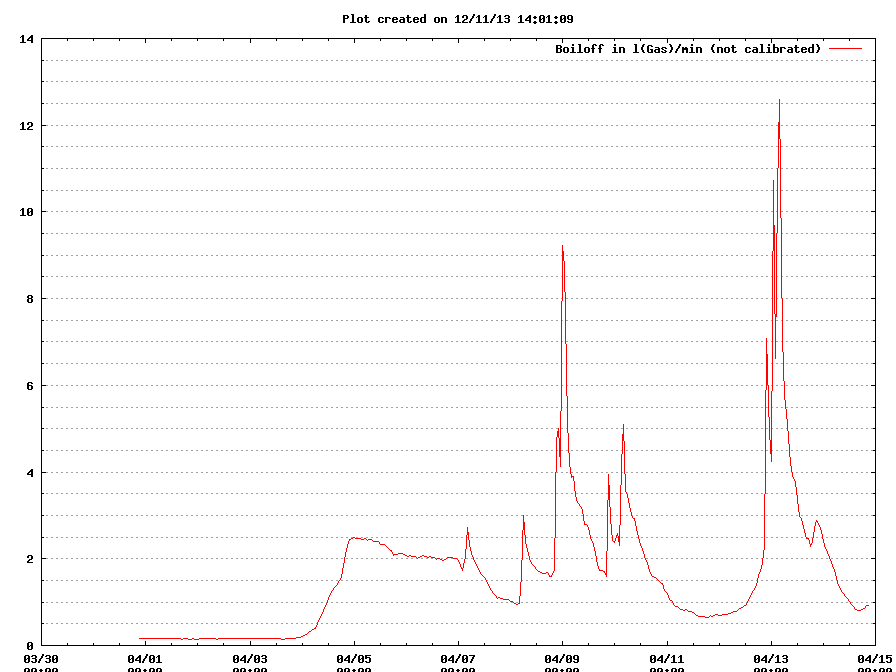
Bay 5 Helium boiloff plots: http://www.nmr.mgh.harvard.edu/~equipmon/coldhead/last2weeks.log_BoilOff.png
Neuroanatomy Information
http://homepage.smc.edu/russell_richard/Psych2/Graphics/human_brain_directions.htm
http://www.neuroanatomy.ca/cross_sections/sections_coronal.html
http://da.biostr.washington.edu/cgi-bin/DA/imageform
http://braininfo.rprc.washington.edu/
Unix & Scripting Tutorials
If you are unfamiliar with the UNIX operating system, there are many online tutorials. Here are a few: http://www.ee.surrey.ac.uk/Teaching/Unix/ http://www.fmrib.ox.ac.uk/fslcourse/unix_intro/ https://supportweb.cs.bham.ac.uk/documentation/tutorials/docsystem/build/tutorials/unixscripting/unixscripting.html
Let Allison know if you are new to UNIX and she'll give you a few more resources.
Life Basics
Choosing/Being a Mentor
Slides from an HMS talk on this topic can be found here.
Taxes
Dylan Tisdall and Martin Reuter have given presentations to explain the U.S. tax protocol to those who are new to it. They are not tax experts, however, they have shared their experiences as a starting point for someone looking to get more information on the process. The slides for this talk can be found here Taxes.pdf.
Travel Safety
Get tips before your trip and alerts during your trip through MGH: http://intranet.massgeneral.org/id/travelsafe/
Business Cards
Generally, these require a sundry fund to purchase.
The cost is $34.25 for 1,000 cards. Email the payment form to partnersformsmanagament@standardregister.com
If you buy from Harvard University, the cost is $35 for 300 cards with 2 colors. It is $45 for full color (if we wanted to use our own logo, we could email them a .tiff with the logo).
Ergonomics
Anastasia Yendiki is a Partners certified ergonomics coach. Please see her if you have any pain or discomfort that you think is associated with how you use your workstation. The Haworth desk chair that most of us have has many degrees of freedom so it can most likely be adjusted to fit you, but it's unlikely that it's adjusted perfectly for you just the way you found it. Small changes can make a lot of difference if you're sitting at your desk for several hours every day.
Partners ergonomics also has a lot of useful info on their site, including a self-assessment questionnaire ("assess your workstation" on the blue side bar on the left):
Temporary Housing
Most require a minimum 30 day stay and provide furnished housing.
National Corporate Housing
The West End Apartments
(Formerly Equity Corp. Housing)
(617) 948-9876
5 Longfellow Pl, Ste. 102 Boston MA
Adjacent to MGH campus
www.nationalcorporatehousing.com
Furnished Quarters
(617) 236-4908
221 Mass. Avenue, Boston, MA
www.furnishedquarters.com
Oakwood Temporary Housing
(617) 723-8050
1 India Street, 2nd floor, Boston, MA
www.oakwood.com
Ask for Maryellen Daly or Deidre Fistori
Interim Housing Solutions
(866) 279-4471
http://www.interimhousingsolutions.com
National program matches individuals with furnished, short-term apartment rental.