
|
Size: 252
Comment:
|
← Revision 5 as of 2017-10-31 15:51:13 ⇥
Size: 581
Comment:
|
| Deletions are marked like this. | Additions are marked like this. |
| Line 5: | Line 5: |
| Line 6: | Line 7: |
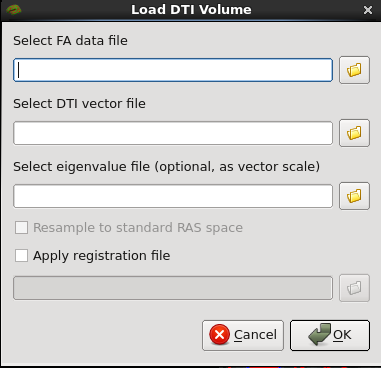
| To load DTI data, click '''file > Load DTI Volume''' on the top menu. This will open a window which will allow you to select the FA data file and DTI vector file along with the optional eigenvalue file and registration file. | |
| Line 7: | Line 9: |
| == Display Options == | {{attachment:load-dti.png}} ---- For more information on diffusion, [[FsTutorial/DiffusionV6.0|see this tutorial.]] |
Up to FreeviewGuide |
Back to FreeviewSurfaces |
Continue to FreeviewPointSet |
DTI
Loading Data
To load DTI data, click file > Load DTI Volume on the top menu. This will open a window which will allow you to select the FA data file and DTI vector file along with the optional eigenvalue file and registration file.
For more information on diffusion, see this tutorial.