
|
Size: 5
Comment:
|
Size: 1756
Comment:
|
| Deletions are marked like this. | Additions are marked like this. |
| Line 1: | Line 1: |
| jka | [[FsTutorial|top]] | [[FsTutorial/LongitudinalTutorial|previous]] == Making FinalSurf edits == *To follow this exercise exactly be sure you've downloaded the [[FsTutorial/Data|tutorial data set]] before you begin. If you choose not to download the data set you can follow these instructions on your own data, but you will have to substitute your own specific paths and subject names. Here we will look at the first time point ( OAS2_0002_MR1 ). In the brain.finalsurfs.mgz volume (your aux volume in tkmedit) you can see the pial surface encroaching into the cerebellum in slices 65-78 : Representative slice 74 shown below, problem at coordinates 161 98 74 in right hemisphere <<BR>> {{attachment:mr1before.jpg}} Zoomed in version is below <<BR>> {{attachment:OAS2_0002_MR1_before_zoomed.jpg}} Go through and remove the voxels in the cerebellum and surrounding areas that cause the pial surface misplacement. Once you are finished editing, save the changes to the volume with File – Save Aux volume. Then make a copy of the edited brain.finalsurfs.mgz file to one called brain.finalsurfs.manedit.mgz in this time point: {{{ cp OAS2_0002_MR1/mri/brain.finalsurfs.mgz OAS2_0002_MR1/mri/brain.finalsurfs.manedit.mgz }}} Next, run the following to have the edits take effect: {{{ recon-all -autorecon3-pial -s OAS2_0002_MR1 }}} The results will look as follows: Notice how the pial surface is now properly pulled in based on the deleted voxels <<BR>> {{attachment:mr1fixed.jpg}} Everything described thus far for MR1 should be repeated for MR2 as required. Next, it is time to fix the base for this subject - return to the [[FsTutorial/LongitudinalTutorial| Longitudinal Tutorial]] to see how. |
Making FinalSurf edits
To follow this exercise exactly be sure you've downloaded the tutorial data set before you begin. If you choose not to download the data set you can follow these instructions on your own data, but you will have to substitute your own specific paths and subject names.
Here we will look at the first time point ( OAS2_0002_MR1 ).
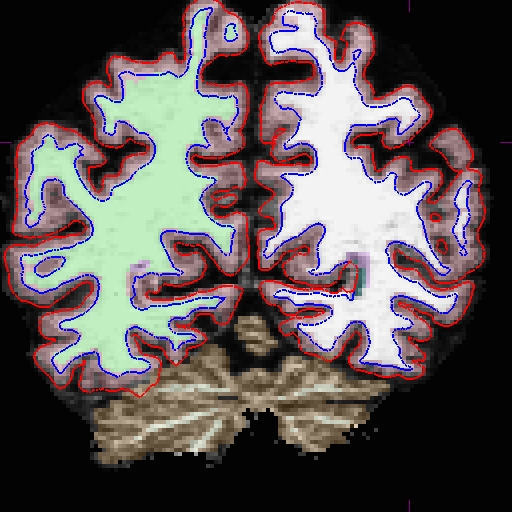
In the brain.finalsurfs.mgz volume (your aux volume in tkmedit) you can see the pial surface encroaching into the cerebellum in slices 65-78 : Representative slice 74 shown below, problem at coordinates 161 98 74 in right hemisphere
Zoomed in version is below
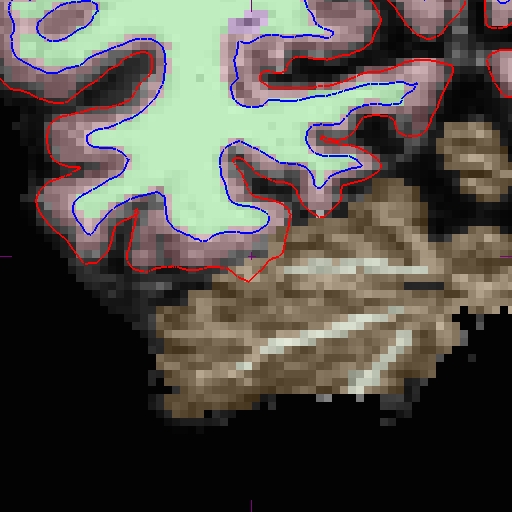
Go through and remove the voxels in the cerebellum and surrounding areas that cause the pial surface misplacement.
Once you are finished editing, save the changes to the volume with File – Save Aux volume. Then make a copy of the edited brain.finalsurfs.mgz file to one called brain.finalsurfs.manedit.mgz in this time point:
cp OAS2_0002_MR1/mri/brain.finalsurfs.mgz OAS2_0002_MR1/mri/brain.finalsurfs.manedit.mgz
Next, run the following to have the edits take effect:
recon-all -autorecon3-pial -s OAS2_0002_MR1
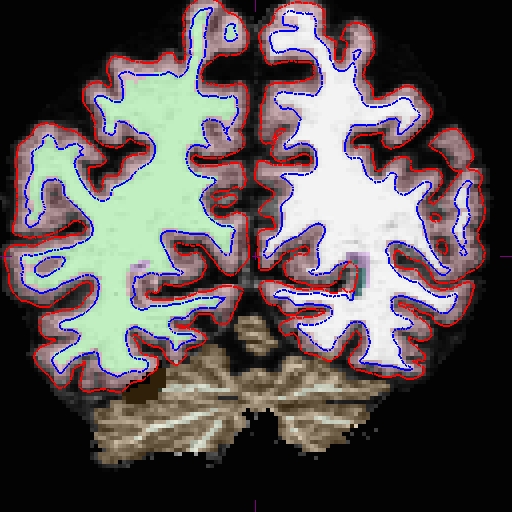
The results will look as follows: Notice how the pial surface is now properly pulled in based on the deleted voxels
Everything described thus far for MR1 should be repeated for MR2 as required. Next, it is time to fix the base for this subject - return to the Longitudinal Tutorial to see how.