
|
Size: 2467
Comment:
|
← Revision 11 as of 2017-09-26 11:39:24 ⇥
Size: 4300
Comment:
|
| Deletions are marked like this. | Additions are marked like this. |
| Line 2: | Line 2: |
| Line 3: | Line 4: |
| *To follow this exercise exactly be sure you've downloaded the [[FsTutorial/Data|tutorial data set]] before you begin. If you choose not to download the data set you can follow these instructions on your own data, but you will have to substitute your own specific paths and subject names. Below is a picture of how the longitudinal results for MR2 looked originally: see |
* To follow this exercise exactly be sure you've downloaded the [[FsTutorial/Data|tutorial data set]] before you begin. If you choose not to download the data set you can follow these instructions on your own data, but you will have to substitute your own specific paths and subject names. Below is a picture of how the longitudinal results for MR2 looked originally. Create a copy of 'brain.finalsurfs.mgz' named 'brain.finalsurfs.manedit.mgz' with the following command: |
| Line 7: | Line 9: |
| tkmedit OAS2_0002_MR2.long.OAS2_0002 brainmask.mgz -aux brain.finalsurfs.mgz -surfs -segmentation aseg.mgz $FREESURFER_HOME/FreeSurferColorLUT.txt | cp OAS2_0002_MR2.long.OAS2_0002/mri/brain.finalsurfs.mgz OAS2_0002_MR2.long.OAS2_0002/mri/brain.finalsurfs.manedit.mgz |
| Line 9: | Line 11: |
| Sample Slice 89 in brain.finalsurfs.mgz, coordinates: 124 138 89 (right hemi) <<BR>> {{attachment:longmr2BEFORE.jpg}} And here it is zoomed in: <<BR>> {{attachment:longmr2BEFOREzoomed.jpg}} Similarly, view the original longitudinal file for MR1 as follows: |
Open the volume with the following: |
| Line 15: | Line 14: |
| tkmedit OAS2_0002_MR1.long.OAS2_0002 brainmask.mgz -aux brain.finalsurfs.mgz -surfs -segmentation aseg.mgz $FREESURFER_HOME/FreeSurferColorLUT.txt | freeview -v OAS2_0002_MR2.long.OAS2_0002/mri/brain.finalsurfs.manedit.mgz \ OAS2_0002_MR2.long.OAS2_0002/mri/aseg.mgz:colormap=lut:opacity=0.25 \ -f OAS2_0002_MR2.long.OAS2_0002/surf/lh.pial:edgecolor=red \ OAS2_0002_MR2.long.OAS2_0002/surf/rh.pial:edgecolor=red \ OAS2_0002_MR2.long.OAS2_0002/surf/lh.white:edgecolor=blue \ OAS2_0002_MR2.long.OAS2_0002/surf/rh.white:edgecolor=blue |
| Line 17: | Line 21: |
| After edits to both cross-sectional time points and the base have been done, the following commands should be run to re-create new long data sets: (Start with renaming the existing long data to something like _orig) For MR2, you would do: |
Sample Slice 89 in brain.finalsurfs.manedit.mgz, coordinates: 111 166 89 (right hemi) <<BR>> {{attachment:longmr2BEFORE.jpg}} {{attachment:longmr2BEFOREzoomed.jpg}} <<BR>> For MR1, similarly, create your copy of 'brain.finalsurfs.manedit.mgz' with the following command: {{{ cp OAS2_0002_MR1.long.OAS2_0002/mri/brain.finalsurfs.mgz OAS2_0002_MR1.long.OAS2_0002/mri/brain.finalsurfs.manedit.mgz }}} View the original longitudinal file for MR1 as follows: {{{ freeview -v OAS2_0002_MR1.long.OAS2_0002/mri/brain.finalsurfs.manedit.mgz \ OAS2_0002_MR1.long.OAS2_0002/mri/aseg.mgz:colormap=lut:opacity=0.25 \ -f OAS2_0002_MR1.long.OAS2_0002/surf/lh.pial:edgecolor=red \ OAS2_0002_MR1.long.OAS2_0002/surf/rh.pial:edgecolor=red \ OAS2_0002_MR1.long.OAS2_0002/surf/lh.white:edgecolor=blue \ OAS2_0002_MR1.long.OAS2_0002/surf/rh.white:edgecolor=blue }}} After edits to both cross-sectional time points and the base have been done, the following commands should be run to re-create new long data sets: (Start with renaming the existing long data to something like _orig as a backup copy). For MR2, you would do: {{{#!wiki caution '''Don't run these recon-all commands''' It will take hours and has already been done for you. }}} |
| Line 22: | Line 47: |
| }}} For MR1, you would do: {{{ |
## For MR1, you would do: |
| Line 29: | Line 53: |
| Line 30: | Line 55: |
| tkmedit OAS2_0002_MR2.long.OAS2_0002_fixed brainmask.mgz -aux brain.finalsurfs.mgz -surfs -segmentation aseg.mgz $FREESURFER_HOME/FreeSurferColorLUT.txt | freeview -v OAS2_0002_MR2.long.OAS2_0002_fixed/mri/brain.finalsurfs.mgz \ OAS2_0002_MR2.long.OAS2_0002_fixed/mri/aseg.mgz:colormap=lut:opacity=0.25 \ -f OAS2_0002_MR2.long.OAS2_0002_fixed/surf/lh.pial:edgecolor=red \ OAS2_0002_MR2.long.OAS2_0002_fixed/surf/rh.pial:edgecolor=red \ OAS2_0002_MR2.long.OAS2_0002_fixed/surf/lh.white:edgecolor=blue \ OAS2_0002_MR2.long.OAS2_0002_fixed/surf/rh.white:edgecolor=blue |
| Line 32: | Line 62: |
| The following shows pictures of sample slice 89 from OAS2_0002_MR2.long.OAS2_0002_fixed in the brain.finalsurfs.mgz volume at coordinates 112 166 89 : <<BR>> {{attachment:longmr2FIXED.jpg}} Zoomed in, we have: <<BR>> {{attachment:longmr2FIXEDzoomed.jpg}} |
The following shows pictures of sample slice 89 from OAS2_0002_MR2.long.OAS2_0002_fixed in the brain.finalsurfs.mgz volume at coordinates 112 166 89 : <<BR>> {{attachment:longmr2FIXED.jpg}} {{attachment:longmr2FIXEDzoomed.jpg}} <<BR>> |
| Line 37: | Line 65: |
| Line 38: | Line 67: |
| tkmedit OAS2_0002_MR1.long.OAS2_0002_fixed brainmask.mgz -aux brain.finalsurfs.mgz -surfs -segmentation aseg.mgz $FREESURFER_HOME/FreeSurferColorLUT.txt | freeview -v OAS2_0002_MR1.long.OAS2_0002_fixed/mri/brain.finalsurfs.mgz \ OAS2_0002_MR1.long.OAS2_0002_fixed/mri/aseg.mgz:colormap=lut:opacity=0.25 \ -f OAS2_0002_MR1.long.OAS2_0002_fixed/surf/lh.pial:edgecolor=red \ OAS2_0002_MR1.long.OAS2_0002_fixed/surf/rh.pial:edgecolor=red \ OAS2_0002_MR1.long.OAS2_0002_fixed/surf/lh.white:edgecolor=blue \ OAS2_0002_MR1.long.OAS2_0002_fixed/surf/rh.white:edgecolor=blue |
Making FinalSurf edits
To follow this exercise exactly be sure you've downloaded the tutorial data set before you begin. If you choose not to download the data set you can follow these instructions on your own data, but you will have to substitute your own specific paths and subject names.
Below is a picture of how the longitudinal results for MR2 looked originally. Create a copy of 'brain.finalsurfs.mgz' named 'brain.finalsurfs.manedit.mgz' with the following command:
cp OAS2_0002_MR2.long.OAS2_0002/mri/brain.finalsurfs.mgz OAS2_0002_MR2.long.OAS2_0002/mri/brain.finalsurfs.manedit.mgz
Open the volume with the following:
freeview -v OAS2_0002_MR2.long.OAS2_0002/mri/brain.finalsurfs.manedit.mgz \
            OAS2_0002_MR2.long.OAS2_0002/mri/aseg.mgz:colormap=lut:opacity=0.25 \
         -f OAS2_0002_MR2.long.OAS2_0002/surf/lh.pial:edgecolor=red \
            OAS2_0002_MR2.long.OAS2_0002/surf/rh.pial:edgecolor=red \
            OAS2_0002_MR2.long.OAS2_0002/surf/lh.white:edgecolor=blue \
            OAS2_0002_MR2.long.OAS2_0002/surf/rh.white:edgecolor=blue
Sample Slice 89 in brain.finalsurfs.manedit.mgz, coordinates: 111 166 89 (right hemi)
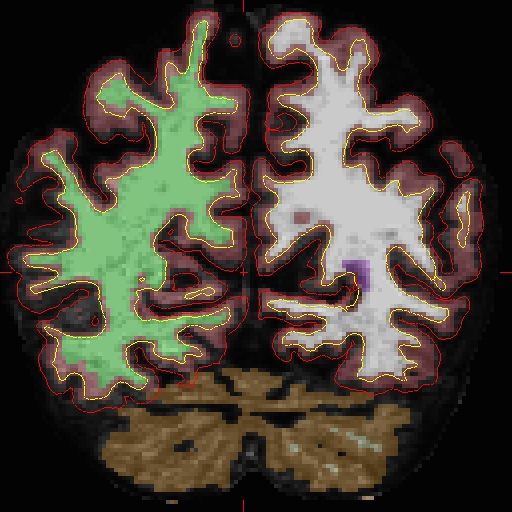
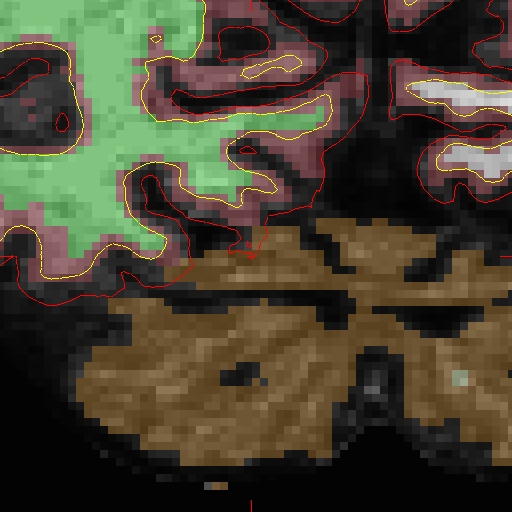
For MR1, similarly, create your copy of 'brain.finalsurfs.manedit.mgz' with the following command:
cp OAS2_0002_MR1.long.OAS2_0002/mri/brain.finalsurfs.mgz OAS2_0002_MR1.long.OAS2_0002/mri/brain.finalsurfs.manedit.mgz
View the original longitudinal file for MR1 as follows:
freeview -v OAS2_0002_MR1.long.OAS2_0002/mri/brain.finalsurfs.manedit.mgz \
            OAS2_0002_MR1.long.OAS2_0002/mri/aseg.mgz:colormap=lut:opacity=0.25 \
         -f OAS2_0002_MR1.long.OAS2_0002/surf/lh.pial:edgecolor=red \
            OAS2_0002_MR1.long.OAS2_0002/surf/rh.pial:edgecolor=red \
            OAS2_0002_MR1.long.OAS2_0002/surf/lh.white:edgecolor=blue \
            OAS2_0002_MR1.long.OAS2_0002/surf/rh.white:edgecolor=blue
After edits to both cross-sectional time points and the base have been done, the following commands should be run to re-create new long data sets: (Start with renaming the existing long data to something like _orig as a backup copy). For MR2, you would do:
Don't run these recon-all commands
It will take hours and has already been done for you.
mv OAS2_0002_MR2.long.OAS2_0002 OAS2_0002_MR2.long.OAS2_0002_orig
recon-all -long OAS2_0002_MR2 OAS2_0002 -all

## For MR1, you would do:
mv OAS2_0002_MR1.long.OAS2_0002 OAS2_0002_MR1.long.OAS2_0002_orig
recon-all -long OAS2_0002_MR1 OAS2_0002 -all
In the re-run the edits are automatically transferred from the cross-sectional. Also the fixed surfaces will be used from the base for initialization producing fixed results in the long run. The results of long re-run can be checked as follows for MR2:
freeview -v OAS2_0002_MR2.long.OAS2_0002_fixed/mri/brain.finalsurfs.mgz \
            OAS2_0002_MR2.long.OAS2_0002_fixed/mri/aseg.mgz:colormap=lut:opacity=0.25 \
         -f OAS2_0002_MR2.long.OAS2_0002_fixed/surf/lh.pial:edgecolor=red \
            OAS2_0002_MR2.long.OAS2_0002_fixed/surf/rh.pial:edgecolor=red \
            OAS2_0002_MR2.long.OAS2_0002_fixed/surf/lh.white:edgecolor=blue \
            OAS2_0002_MR2.long.OAS2_0002_fixed/surf/rh.white:edgecolor=blue
The following shows pictures of sample slice 89 from OAS2_0002_MR2.long.OAS2_0002_fixed in the brain.finalsurfs.mgz volume at coordinates 112 166 89 :
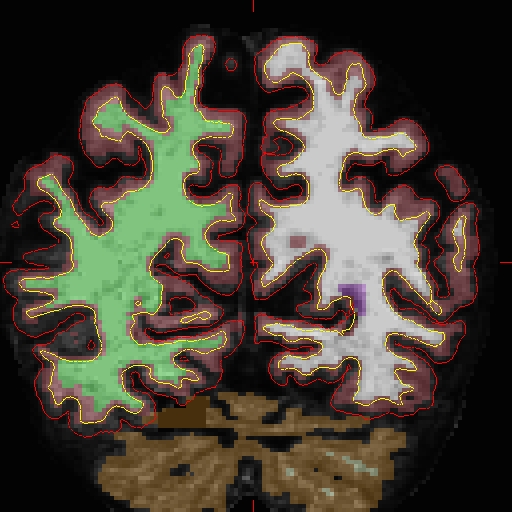
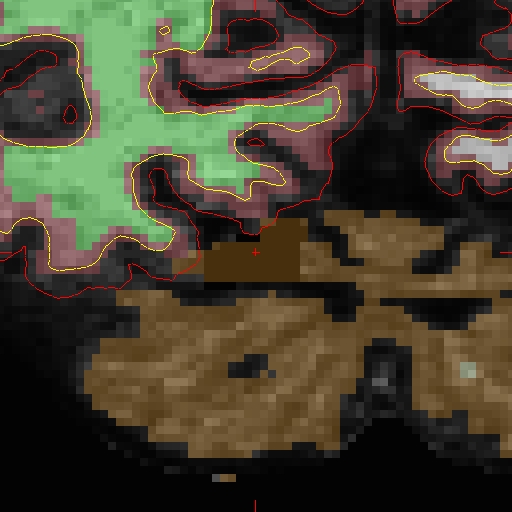
For MR1, look at the results of re-running here:
freeview -v OAS2_0002_MR1.long.OAS2_0002_fixed/mri/brain.finalsurfs.mgz \
            OAS2_0002_MR1.long.OAS2_0002_fixed/mri/aseg.mgz:colormap=lut:opacity=0.25 \
         -f OAS2_0002_MR1.long.OAS2_0002_fixed/surf/lh.pial:edgecolor=red \
            OAS2_0002_MR1.long.OAS2_0002_fixed/surf/rh.pial:edgecolor=red \
            OAS2_0002_MR1.long.OAS2_0002_fixed/surf/lh.white:edgecolor=blue \
            OAS2_0002_MR1.long.OAS2_0002_fixed/surf/rh.white:edgecolor=blue